

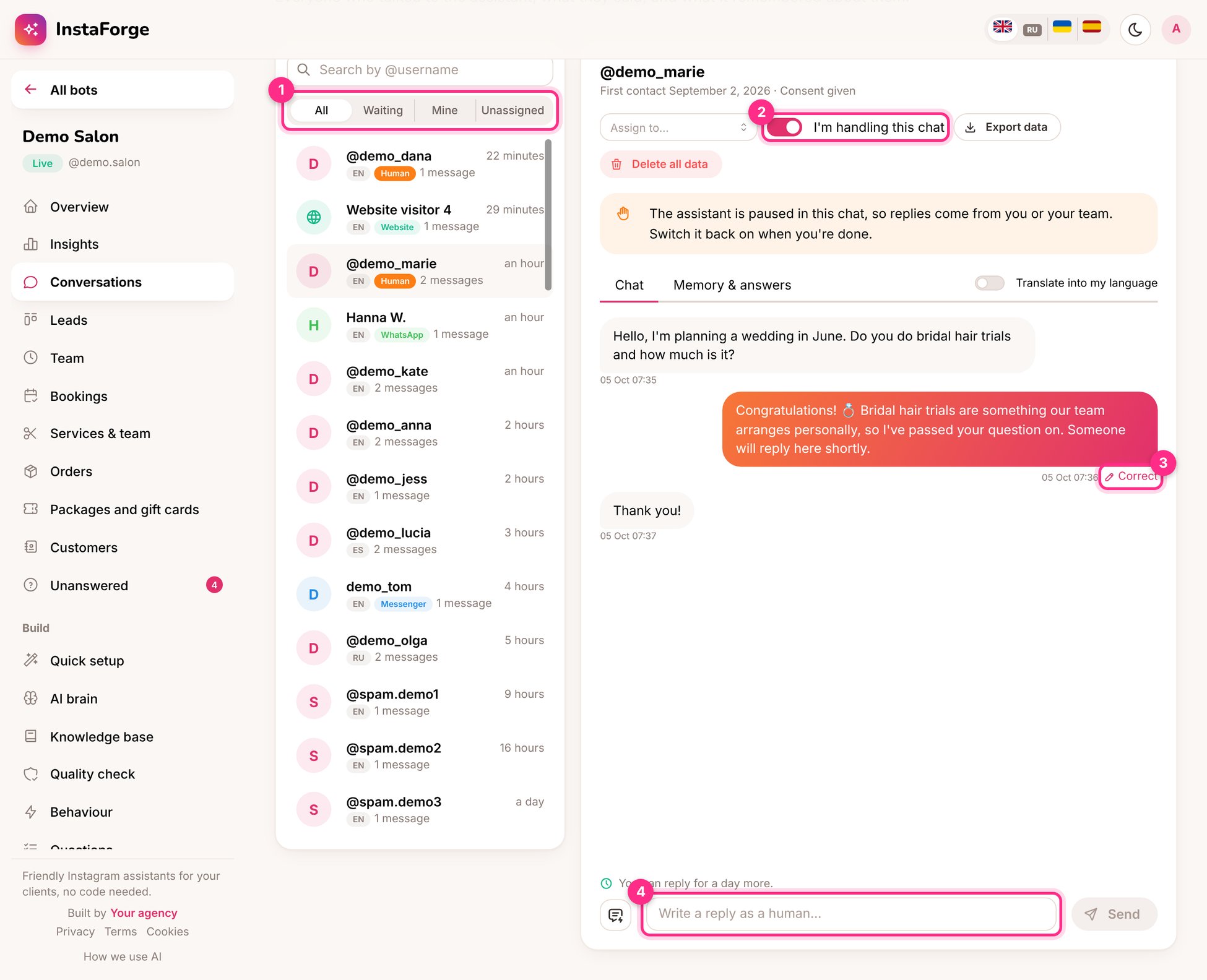
The inbox: filters (1), taking over a chat (2), correcting an answer (3) and replying (4)
Filters (1)
Take over a chat (2)
Switch on I’m handling this chat. The assistant pauses in that chat, so replies come from you or your team. Switch it off when you’re done and the assistant carries on. The assistant pauses on its own when someone asks for a person, and the chat moves to Waiting with an alert to your team.Reply as a person (4)
Type in the box at the bottom. The saved replies button inserts texts you use often (“Thanks for waiting”, directions). Instagram lets the business write freely for 24 hours after the customer’s last message; the box tells you how long is left.Correct a wrong answer (3)
Click Correct under any reply from the assistant and write what it should have said. The right answer becomes an FAQ straight away, so the next person gets it.Memory and answers
The Memory & answers tab shows what the assistant remembered about the person (name, preferences) and the answers they gave to question flows.More in each conversation
- Assign to a team member
- Translate into my language to read a chat in any language
- Export data or Delete all data for privacy requests