> ## Documentation Index
> Fetch the complete documentation index at: https://docs.instaforge.app/llms.txt
> Use this file to discover all available pages before exploring further.
# Billing
> What each client owes this month, payment links, reminders and receipts.
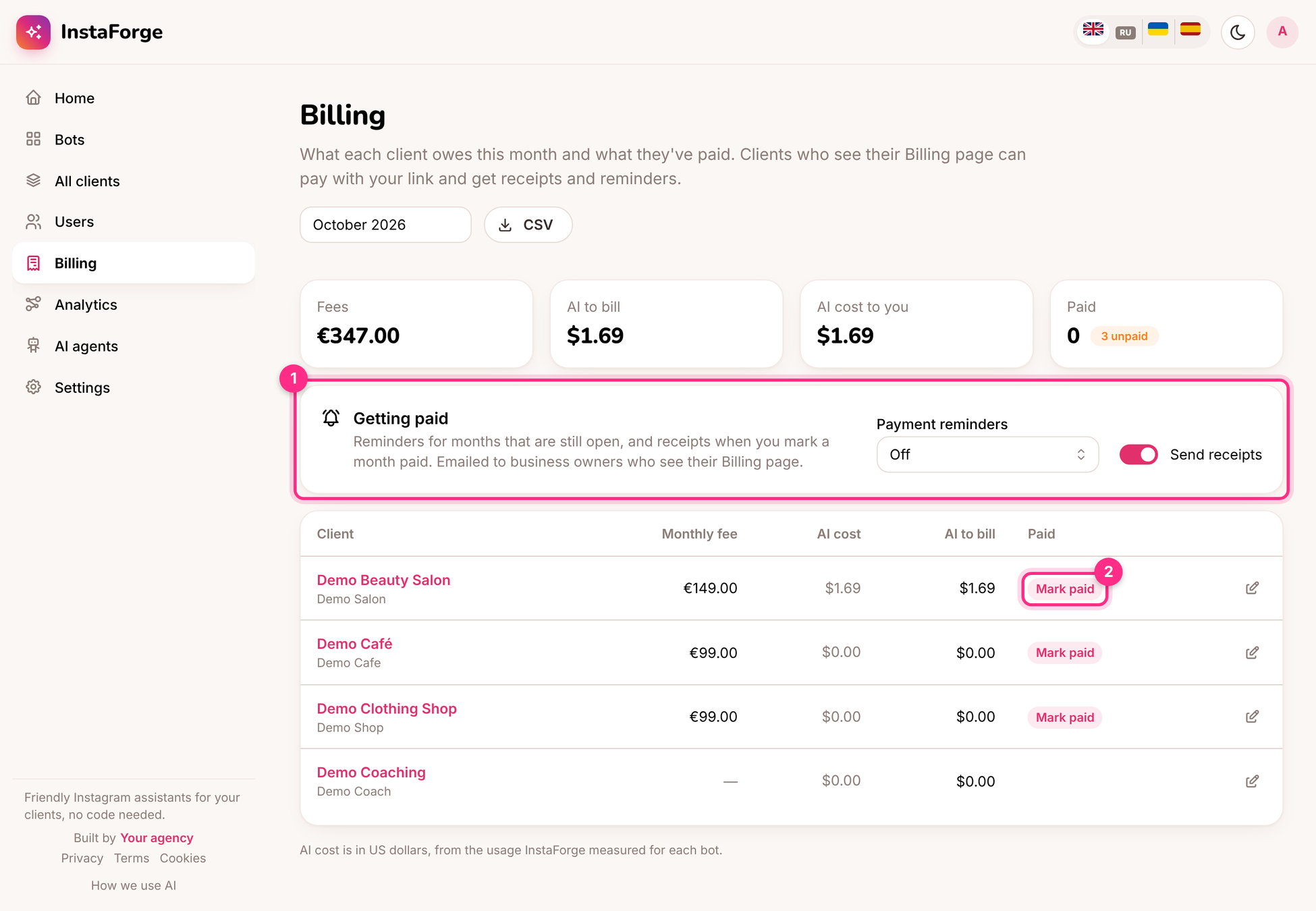
**Billing** shows what each client owes for the month: their monthly fee, and the AI cost if you pass it on.
 ## Set a client's fee
Click the edit button on the client's row and set the monthly fee, the currency, and a **payment link** (a Stripe payment link, PayPal, a bank transfer page). Choose whether to bill the AI cost on top.
## Getting paid (1)
* **Payment reminders:** emailed to business owners who see their Billing page, for months that are still open.
* **Send receipts:** when you mark a month paid, the owner gets a receipt.
* **Mark paid (2):** when the money arrives.
* **CSV:** the month's figures for your accountant.
## What the client sees
With **Billing** turned on in their [portal](/client-portal), owners see what they owe, can pay with your link, and can download a statement of past months.
**AI cost to you** is what the AI provider charges for the client's assistant, measured per assistant. **AI to bill** is what you pass on. When the client uses their own API key, the provider bills them directly.
This documentation is built and hosted on [Mintlify](https://mintlify.com), a developer documentation platform.
## Set a client's fee
Click the edit button on the client's row and set the monthly fee, the currency, and a **payment link** (a Stripe payment link, PayPal, a bank transfer page). Choose whether to bill the AI cost on top.
## Getting paid (1)
* **Payment reminders:** emailed to business owners who see their Billing page, for months that are still open.
* **Send receipts:** when you mark a month paid, the owner gets a receipt.
* **Mark paid (2):** when the money arrives.
* **CSV:** the month's figures for your accountant.
## What the client sees
With **Billing** turned on in their [portal](/client-portal), owners see what they owe, can pay with your link, and can download a statement of past months.
**AI cost to you** is what the AI provider charges for the client's assistant, measured per assistant. **AI to bill** is what you pass on. When the client uses their own API key, the provider bills them directly.
This documentation is built and hosted on [Mintlify](https://mintlify.com), a developer documentation platform.