> ## Documentation Index
> Fetch the complete documentation index at: https://docs.instaforge.app/llms.txt
> Use this file to discover all available pages before exploring further.
# Backups and monitoring
> Nightly encrypted backups, a check every minute that everything is running, and alerts about errors on the server.
Backups and monitoring cover the whole platform, so they belong to the [platform owner](/running-the-agency/agencies). Agency admins don't see these pages.
## Backups
Every night at 02:30 UTC the database and uploaded files are encrypted and copied to Cloudflare R2 (or any S3 storage). Recent days, weeks and months are kept. The platform owner gets an alert if a backup fails.
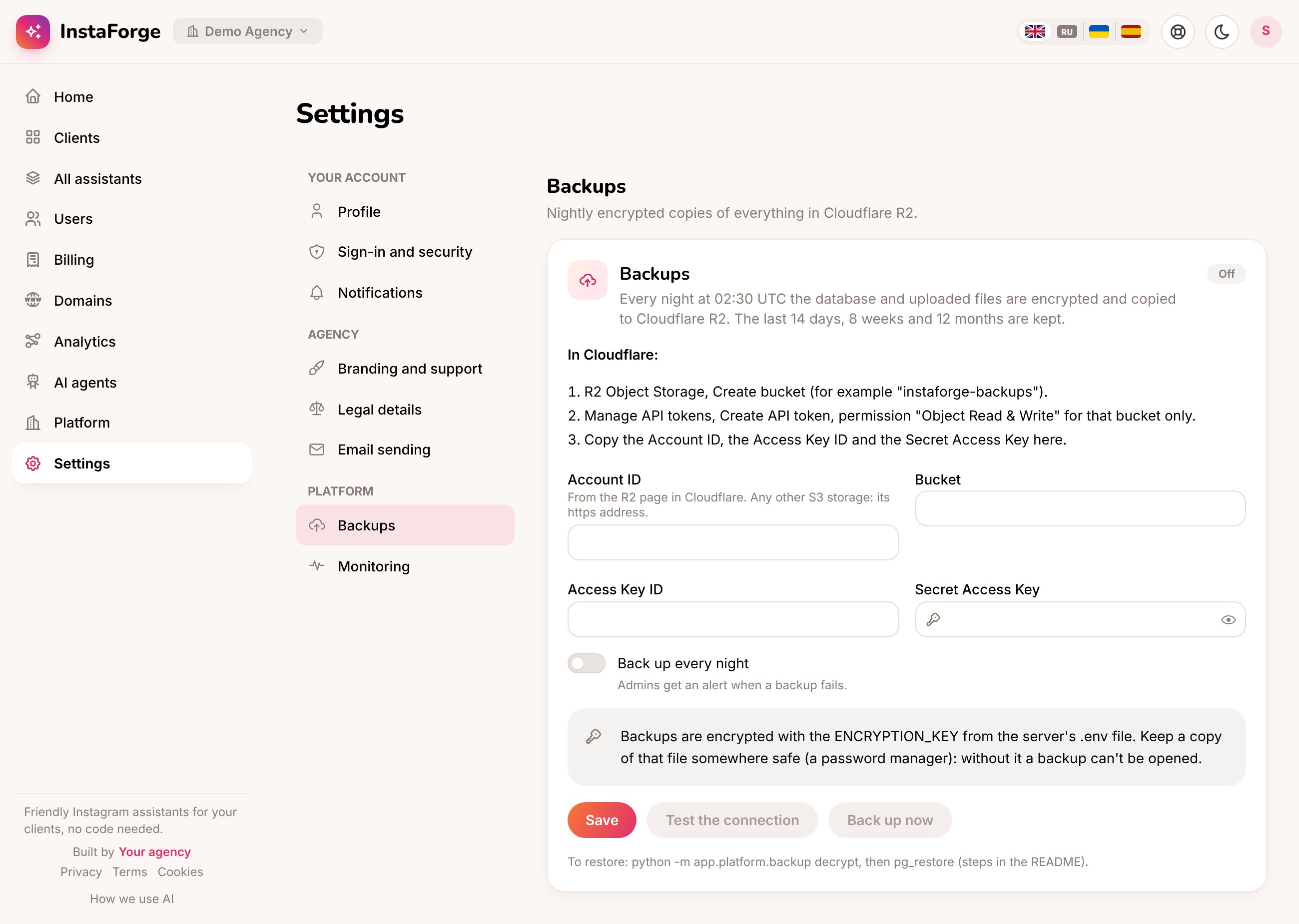 In Cloudflare: **R2 Object Storage → Create bucket**, for example `instaforge-backups`.
**Manage API tokens → Create API token**, with permission "Object Read & Write" for that bucket only.
The Account ID, the bucket, the Access Key ID and the Secret Access Key. Switch on **Back up every night** and save.
Backups are encrypted with the `ENCRYPTION_KEY` from the server's `.env` file. Keep a copy of that file somewhere safe, such as a password manager. Without it, a backup can't be restored.
## Monitoring
Every minute the platform checks itself: the website, the database, the queue, the disk and the backups. A problem that lasts 3 minutes is reported to the platform owner's phone or Telegram, and again when it's fixed.
## Errors
When something on the server fails (a page's request or a background job such as sending a broadcast), it's recorded and grouped: the same problem a hundred times is one line, with how many times it happened and when. The list is in **Analytics → System health**.
In Cloudflare: **R2 Object Storage → Create bucket**, for example `instaforge-backups`.
**Manage API tokens → Create API token**, with permission "Object Read & Write" for that bucket only.
The Account ID, the bucket, the Access Key ID and the Secret Access Key. Switch on **Back up every night** and save.
Backups are encrypted with the `ENCRYPTION_KEY` from the server's `.env` file. Keep a copy of that file somewhere safe, such as a password manager. Without it, a backup can't be restored.
## Monitoring
Every minute the platform checks itself: the website, the database, the queue, the disk and the backups. A problem that lasts 3 minutes is reported to the platform owner's phone or Telegram, and again when it's fixed.
## Errors
When something on the server fails (a page's request or a background job such as sending a broadcast), it's recorded and grouped: the same problem a hundred times is one line, with how many times it happened and when. The list is in **Analytics → System health**.
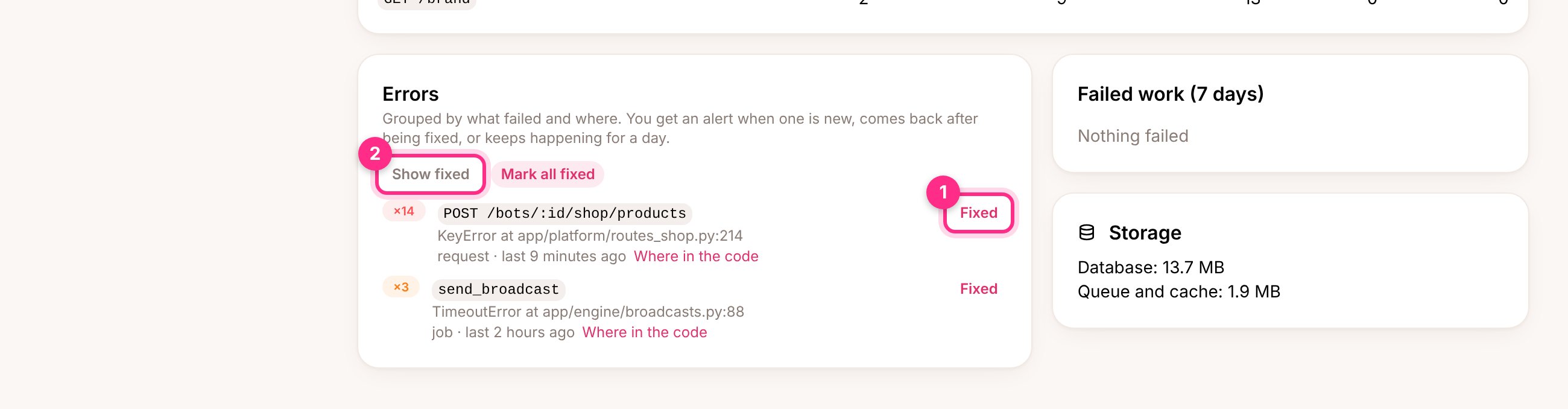 The platform owner gets an alert on their phone or in Telegram:
* when a new error appears,
* when an error marked **Fixed** (1) happens again,
* at most once a day while an error keeps happening.
**Where in the code** shows which lines of InstaForge the error went through, to pass on to whoever maintains the server. Only the type of error, the page or job, and those code lines are kept, for 30 days. The error's message, what was sent with the request and anyone's IP address are never stored, because they can contain personal details or keys.
An [AI agent](/running-the-agency/ai-agents) connected as the platform owner can list the errors and mark them fixed.
**Recommended:** the platform can't report when the whole server is down. Create a free check at an outside monitoring service and paste its ping address as the **Heartbeat address** in **Settings → Monitoring**. If the pings stop, that service tells you.
This documentation is built and hosted on [Mintlify](https://mintlify.com), a developer documentation platform.
The platform owner gets an alert on their phone or in Telegram:
* when a new error appears,
* when an error marked **Fixed** (1) happens again,
* at most once a day while an error keeps happening.
**Where in the code** shows which lines of InstaForge the error went through, to pass on to whoever maintains the server. Only the type of error, the page or job, and those code lines are kept, for 30 days. The error's message, what was sent with the request and anyone's IP address are never stored, because they can contain personal details or keys.
An [AI agent](/running-the-agency/ai-agents) connected as the platform owner can list the errors and mark them fixed.
**Recommended:** the platform can't report when the whole server is down. Create a free check at an outside monitoring service and paste its ping address as the **Heartbeat address** in **Settings → Monitoring**. If the pings stop, that service tells you.
This documentation is built and hosted on [Mintlify](https://mintlify.com), a developer documentation platform.