> ## Documentation Index
> Fetch the complete documentation index at: https://docs.instaforge.app/llms.txt
> Use this file to discover all available pages before exploring further.
# AI agents (Claude)
> Let Claude build and manage assistants for you, straight from a chat.
You can connect an AI assistant such as **Claude** to InstaForge and ask it, in plain words, to add a client and build its assistant, add FAQs, check unanswered questions, schedule posts or send a monthly report. A connected agent acts as you: it can do exactly what your role allows, nothing more.
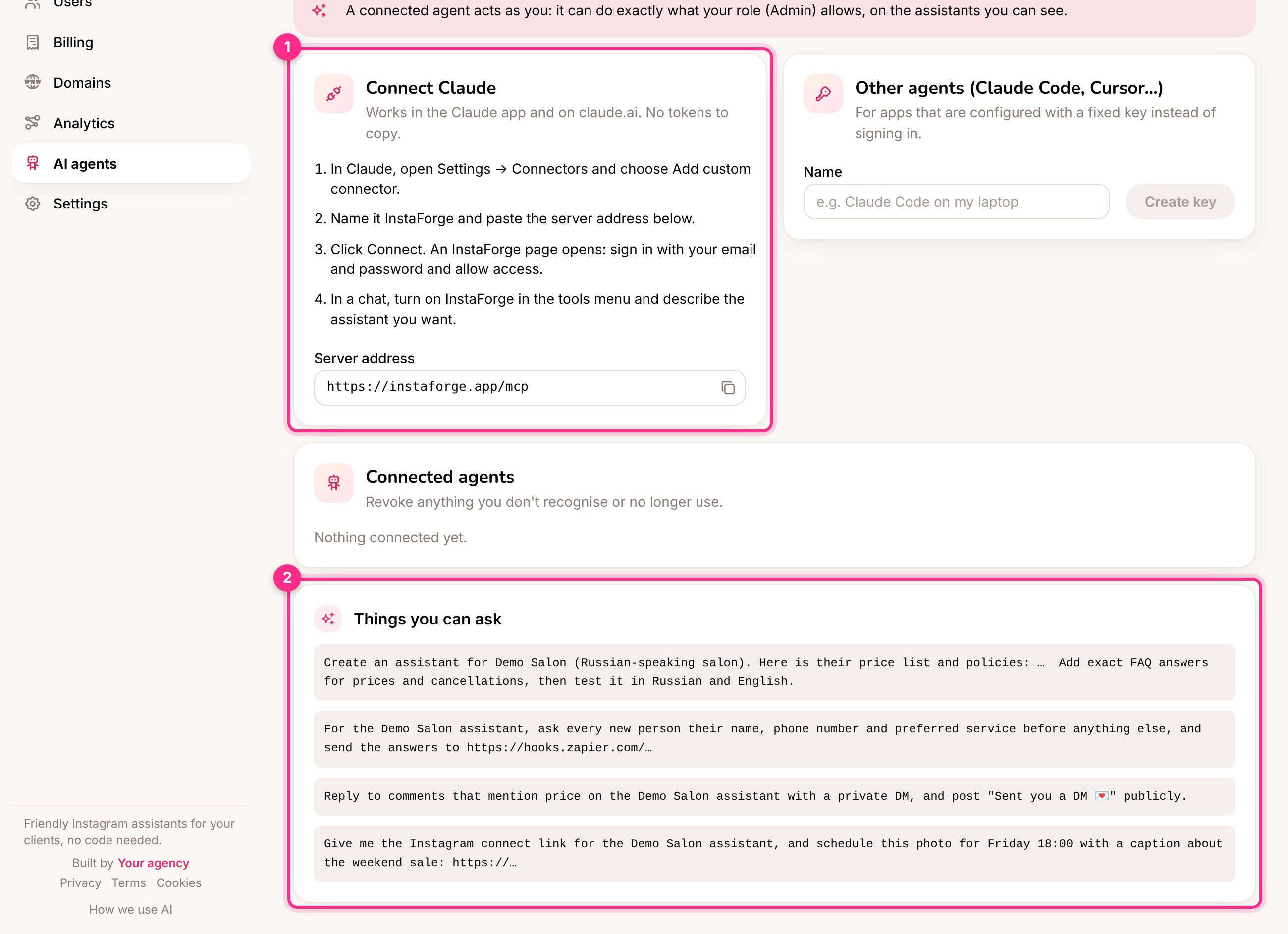 ## Connect Claude
In Claude, open **Settings → Connectors** and choose **Add custom connector**.
Name it InstaForge and paste the **Server address** shown on the **AI agents** page: `https://instaforge.app/mcp`. It stays on instaforge.app even though the dashboard is at portal.instaforge.app, so agents you already connected keep working.
Click **Connect**. An InstaForge page opens: sign in with your email and password and approve.
In a chat, turn on InstaForge in the tools menu and describe what you want.
For apps configured with a fixed key instead of signing in (Claude Code, Cursor and others), create a key under **Other agents**. You're asked for your password, and your two-step code if it's on. A key lasts up to a year.
Changing your password disconnects every agent and key, so connect them again afterwards.
When an agent sets up a new assistant, it gives you a link to send the client for connecting Instagram. The link works once, for 24 hours.
## Things you can ask
> Add Demo Salon as a new client (Russian-speaking salon). Here is their price list and policies: … Add exact FAQ answers for prices and cancellations, then test it in Russian and English.
> What did the Demo Salon assistant fail to answer this week? Draft answers I can approve.
> Schedule this photo for Friday 18:00 with a caption about the weekend offer.
> Show me which clients haven't paid this month.
> Demo Salon opened a second branch with its own Instagram. Add an assistant for it, copy the knowledge about the new address, and tell me what to send them to connect Instagram.
> Give Demo Salon one inbox per assistant, and let the city centre assistant answer the website chat.
> Give Demo Salon the address portal.demo-salon.com and tell me what DNS record to send them. (Admins: see [Custom domains](/running-the-agency/custom-domains).)
> Make a Studio plan at 79 EUR a month with up to 10 assistants and a 14-day trial, and put Demo Studio on it. (Platform owner: see [Plans](/running-the-agency/plans).)
> Draft a reply to the person waiting in Demo Salon's inbox, show it to me, and send it once I say OK.
> Make a demo for Demo Pilates from demo-pilates.example.com and give me the link to send them. (See [Demos for prospects](/running-the-agency/demos).)
> Show me the Google reviews of Demo Salon that still need a reply, with the drafts. Publish the ones I approve. (See [Google reviews](/grow-sales/google-reviews).)
> When does our free trial end? Give me the link to subscribe. (Agency admins.)
Revoke any agent you don't recognise or no longer use under **Connected agents**.
This documentation is built and hosted on [Mintlify](https://mintlify.com), a developer documentation platform.
## Connect Claude
In Claude, open **Settings → Connectors** and choose **Add custom connector**.
Name it InstaForge and paste the **Server address** shown on the **AI agents** page: `https://instaforge.app/mcp`. It stays on instaforge.app even though the dashboard is at portal.instaforge.app, so agents you already connected keep working.
Click **Connect**. An InstaForge page opens: sign in with your email and password and approve.
In a chat, turn on InstaForge in the tools menu and describe what you want.
For apps configured with a fixed key instead of signing in (Claude Code, Cursor and others), create a key under **Other agents**. You're asked for your password, and your two-step code if it's on. A key lasts up to a year.
Changing your password disconnects every agent and key, so connect them again afterwards.
When an agent sets up a new assistant, it gives you a link to send the client for connecting Instagram. The link works once, for 24 hours.
## Things you can ask
> Add Demo Salon as a new client (Russian-speaking salon). Here is their price list and policies: … Add exact FAQ answers for prices and cancellations, then test it in Russian and English.
> What did the Demo Salon assistant fail to answer this week? Draft answers I can approve.
> Schedule this photo for Friday 18:00 with a caption about the weekend offer.
> Show me which clients haven't paid this month.
> Demo Salon opened a second branch with its own Instagram. Add an assistant for it, copy the knowledge about the new address, and tell me what to send them to connect Instagram.
> Give Demo Salon one inbox per assistant, and let the city centre assistant answer the website chat.
> Give Demo Salon the address portal.demo-salon.com and tell me what DNS record to send them. (Admins: see [Custom domains](/running-the-agency/custom-domains).)
> Make a Studio plan at 79 EUR a month with up to 10 assistants and a 14-day trial, and put Demo Studio on it. (Platform owner: see [Plans](/running-the-agency/plans).)
> Draft a reply to the person waiting in Demo Salon's inbox, show it to me, and send it once I say OK.
> Make a demo for Demo Pilates from demo-pilates.example.com and give me the link to send them. (See [Demos for prospects](/running-the-agency/demos).)
> Show me the Google reviews of Demo Salon that still need a reply, with the drafts. Publish the ones I approve. (See [Google reviews](/grow-sales/google-reviews).)
> When does our free trial end? Give me the link to subscribe. (Agency admins.)
Revoke any agent you don't recognise or no longer use under **Connected agents**.
This documentation is built and hosted on [Mintlify](https://mintlify.com), a developer documentation platform.