> ## Documentation Index
> Fetch the complete documentation index at: https://docs.instaforge.app/llms.txt
> Use this file to discover all available pages before exploring further.
# Agencies and the platform owner
> Run several agencies on one platform: add them, limit their assistants and features, step in to help, and pause them.
One InstaForge platform can run several agencies. Each agency has its own team, clients, assistants, branding, legal details, billing and alerts, and never sees another agency. The **platform owner** creates the agencies, decides how many assistants each may have and which features it gets, and can pause one.
This page is for the platform owner. Agency admins don't see any of it: for them InstaForge looks exactly as before.
 ## Add an agency
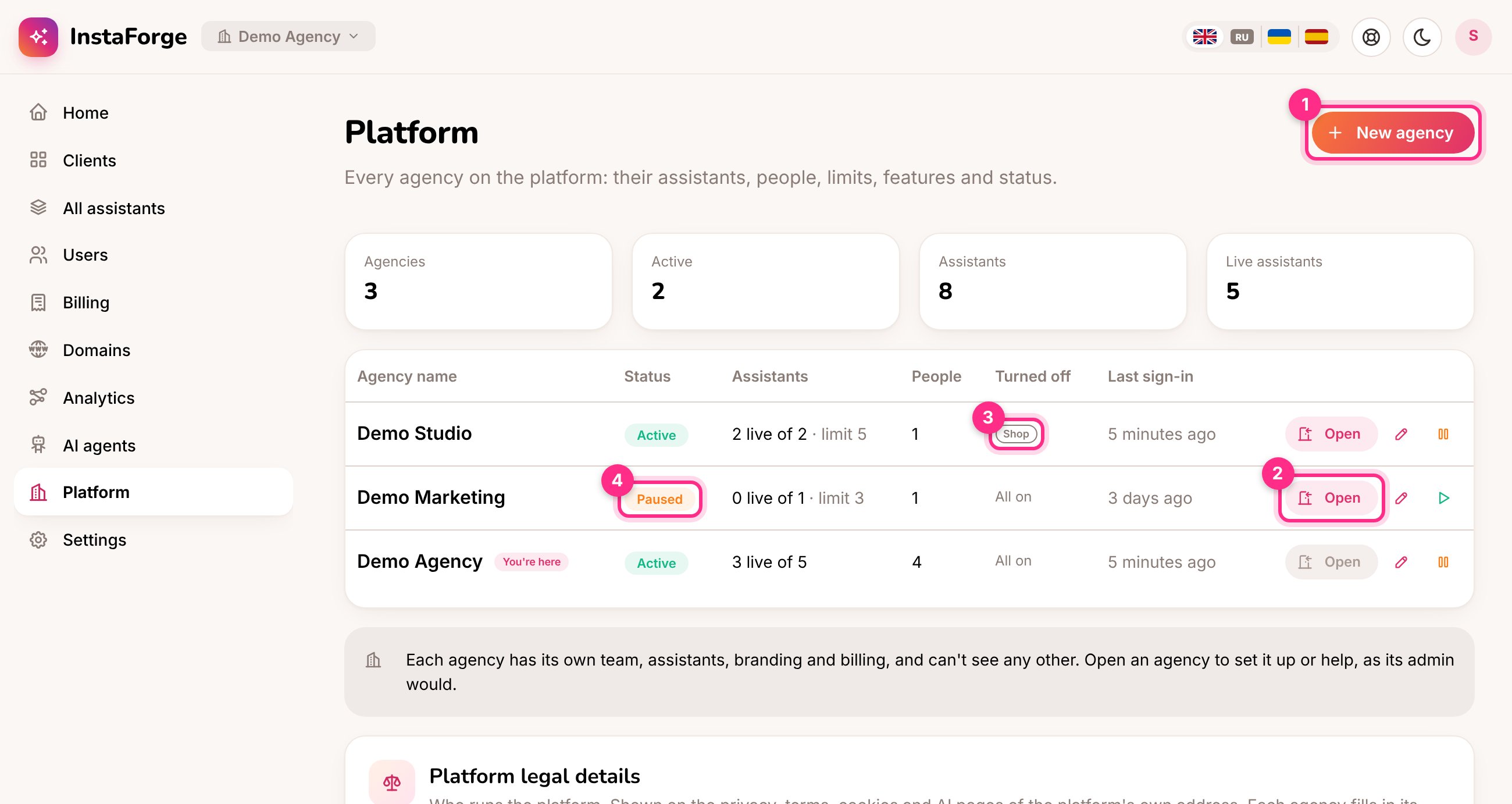
On the **Platform** page, click **New agency** (1).
Type the agency's name and its first admin's name and email, and pick their language. The admin gets an invitation by email to choose a password, then invites the rest of their team on the **Users** page.
Set an **Assistant limit** (leave it empty for no limit) and turn off any features the agency doesn't get. Click **Create and invite**.
## Assistant limit and features
Click the pencil next to an agency to change its name, assistant limit, features or your own notes about it.
## Add an agency
On the **Platform** page, click **New agency** (1).
Type the agency's name and its first admin's name and email, and pick their language. The admin gets an invitation by email to choose a password, then invites the rest of their team on the **Users** page.
Set an **Assistant limit** (leave it empty for no limit) and turn off any features the agency doesn't get. Click **Create and invite**.
## Assistant limit and features
Click the pencil next to an agency to change its name, assistant limit, features or your own notes about it.
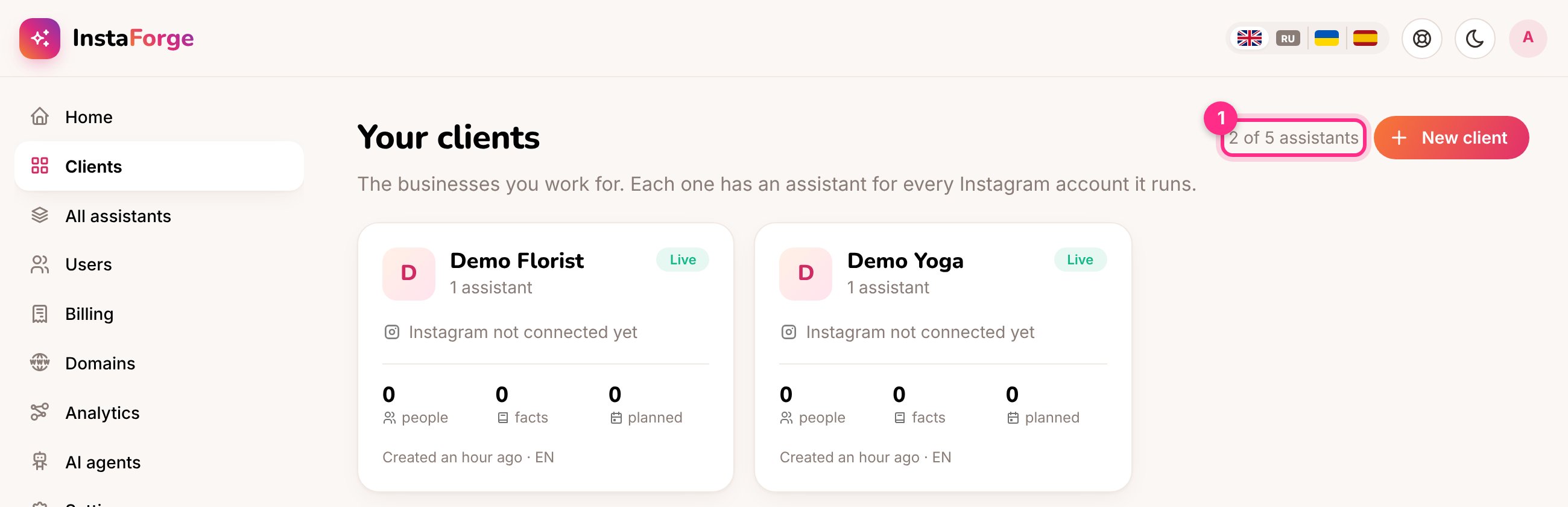
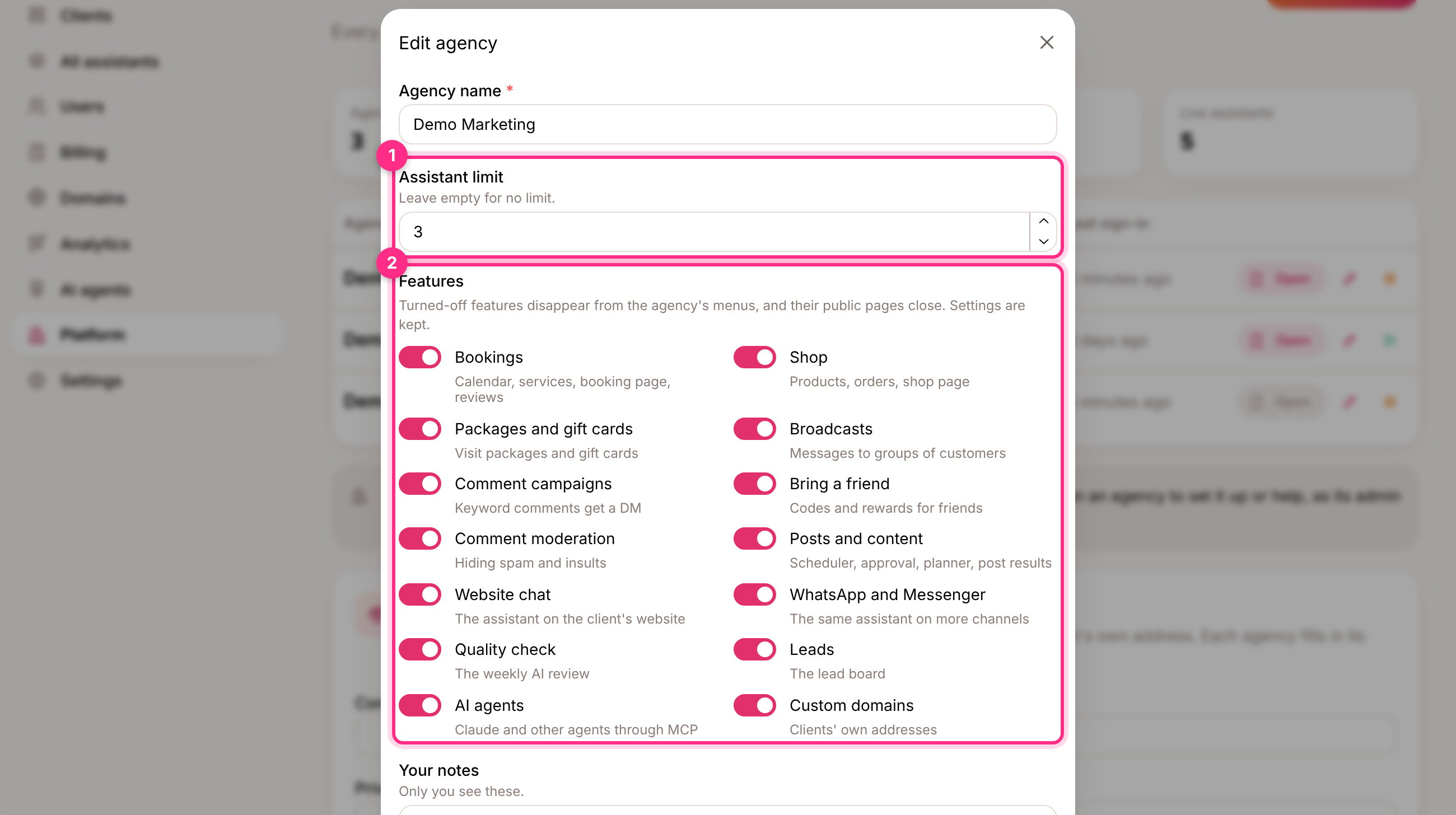 * **Assistant limit:** the limit counts assistants, not clients, so a client with two Instagram accounts uses two. Once an agency reaches it, **New client** and **Add an assistant** are greyed out, and the clients list shows how many they have of how many they may have.
 * **Features:** a feature that's turned off disappears from the agency's menus and its public pages close (for example the shop page). The agency's settings for it are kept, so turning it back on restores everything.
| Feature | What it covers |
| - | - |
| Bookings | Calendar, services, booking page, reviews |
| Shop | Products, orders, the shop page |
| Packages and gift cards | Visit packages and gift cards |
| Broadcasts | Messages to groups of customers |
| Comment campaigns | A keyword in a comment gets a private message |
| Bring a friend | Codes and rewards for friends |
| Comment moderation | Hiding spam and insults |
| Posts and content | Scheduler, post approval, content planner, post results |
| Website chat | The assistant on the client's website |
| WhatsApp and Messenger | The same assistant on more channels |
| Quality check | The weekly AI review |
| Leads | The lead board |
| AI agents | Claude and other agents connected to InstaForge |
| Custom domains | Clients' own addresses |
## Open an agency
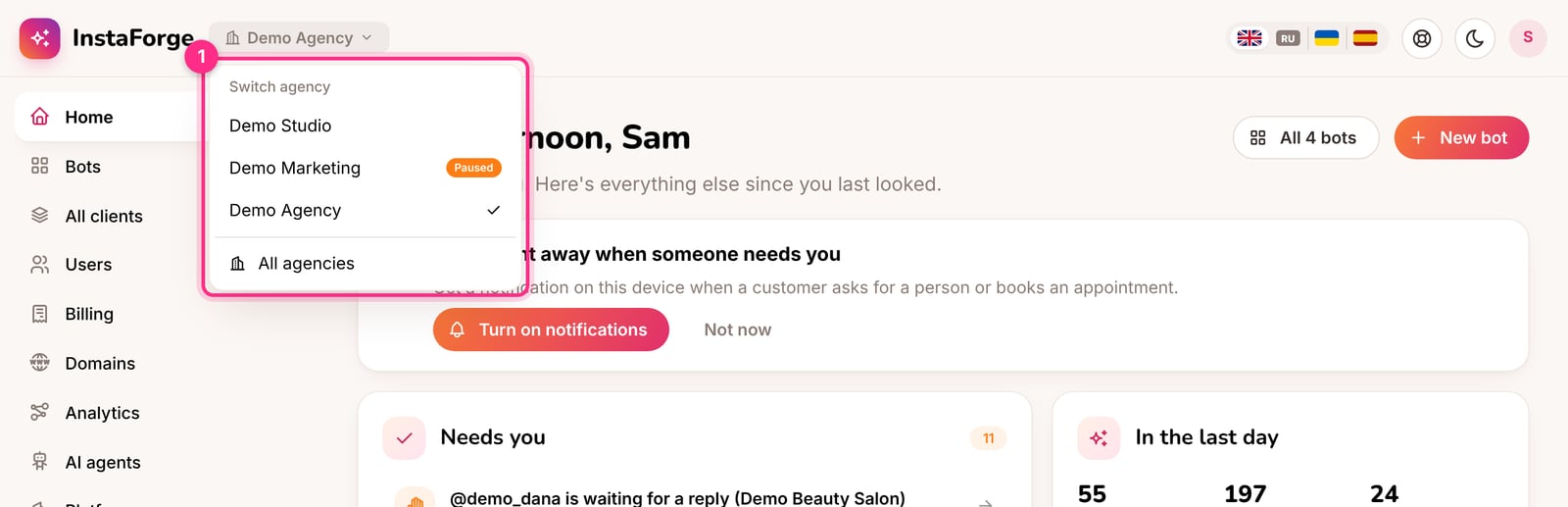
Click **Open** (2) to work inside an agency as its admin would: set up its first clients, check something for them, or fix a problem. The agency you're in shows at the top left, next to the logo. Click it to switch to another agency or go back to all agencies.
* **Features:** a feature that's turned off disappears from the agency's menus and its public pages close (for example the shop page). The agency's settings for it are kept, so turning it back on restores everything.
| Feature | What it covers |
| - | - |
| Bookings | Calendar, services, booking page, reviews |
| Shop | Products, orders, the shop page |
| Packages and gift cards | Visit packages and gift cards |
| Broadcasts | Messages to groups of customers |
| Comment campaigns | A keyword in a comment gets a private message |
| Bring a friend | Codes and rewards for friends |
| Comment moderation | Hiding spam and insults |
| Posts and content | Scheduler, post approval, content planner, post results |
| Website chat | The assistant on the client's website |
| WhatsApp and Messenger | The same assistant on more channels |
| Quality check | The weekly AI review |
| Leads | The lead board |
| AI agents | Claude and other agents connected to InstaForge |
| Custom domains | Clients' own addresses |
## Open an agency
Click **Open** (2) to work inside an agency as its admin would: set up its first clients, check something for them, or fix a problem. The agency you're in shows at the top left, next to the logo. Click it to switch to another agency or go back to all agencies.
 Agency admins never see your account in their Users list, and you don't get their alerts or weekly emails.
## Pause an agency
Click the pause button next to an agency, for example when they stop paying. While it's paused (4):
* its team is signed out and can't sign in,
* its assistants stop answering on Instagram, WhatsApp, Messenger and the website,
* its booking pages, shop and website chat close.
Nothing is deleted. Click the play button to resume it and everything works again.
## What stays with the platform owner
| | Who looks after it |
| - | - |
| Backups and monitoring | The platform owner (Settings) |
| System health | The platform owner (Analytics) |
| Legal details on the platform's own address | The platform owner (bottom of the Platform page) |
| Branding, legal details, email and alerts of an agency | That agency's admins (Settings) |
| Billing of an agency's clients | That agency |
Everything that existed before agencies (the team, clients, assistants, branding and settings) became the first agency. Nothing changed for its people. Rename it on the Platform page if you like.
No. Clients, assistants, people, conversations, numbers and settings of other agencies look like they don't exist.
No, an email address belongs to one agency. Use a different address for the second one.
This documentation is built and hosted on [Mintlify](https://mintlify.com), a developer documentation platform.
Agency admins never see your account in their Users list, and you don't get their alerts or weekly emails.
## Pause an agency
Click the pause button next to an agency, for example when they stop paying. While it's paused (4):
* its team is signed out and can't sign in,
* its assistants stop answering on Instagram, WhatsApp, Messenger and the website,
* its booking pages, shop and website chat close.
Nothing is deleted. Click the play button to resume it and everything works again.
## What stays with the platform owner
| | Who looks after it |
| - | - |
| Backups and monitoring | The platform owner (Settings) |
| System health | The platform owner (Analytics) |
| Legal details on the platform's own address | The platform owner (bottom of the Platform page) |
| Branding, legal details, email and alerts of an agency | That agency's admins (Settings) |
| Billing of an agency's clients | That agency |
Everything that existed before agencies (the team, clients, assistants, branding and settings) became the first agency. Nothing changed for its people. Rename it on the Platform page if you like.
No. Clients, assistants, people, conversations, numbers and settings of other agencies look like they don't exist.
No, an email address belongs to one agency. Use a different address for the second one.
This documentation is built and hosted on [Mintlify](https://mintlify.com), a developer documentation platform.