> ## Documentation Index
> Fetch the complete documentation index at: https://docs.instaforge.app/llms.txt
> Use this file to discover all available pages before exploring further.

# Website chat

> The same assistant on the business's own website, as a chat bubble and a shareable link.

The website chat puts the same assistant on the business's own website: same knowledge, rules, question flows and bookings as on Instagram. It doesn't need Meta's approval, so it can go live on day one.
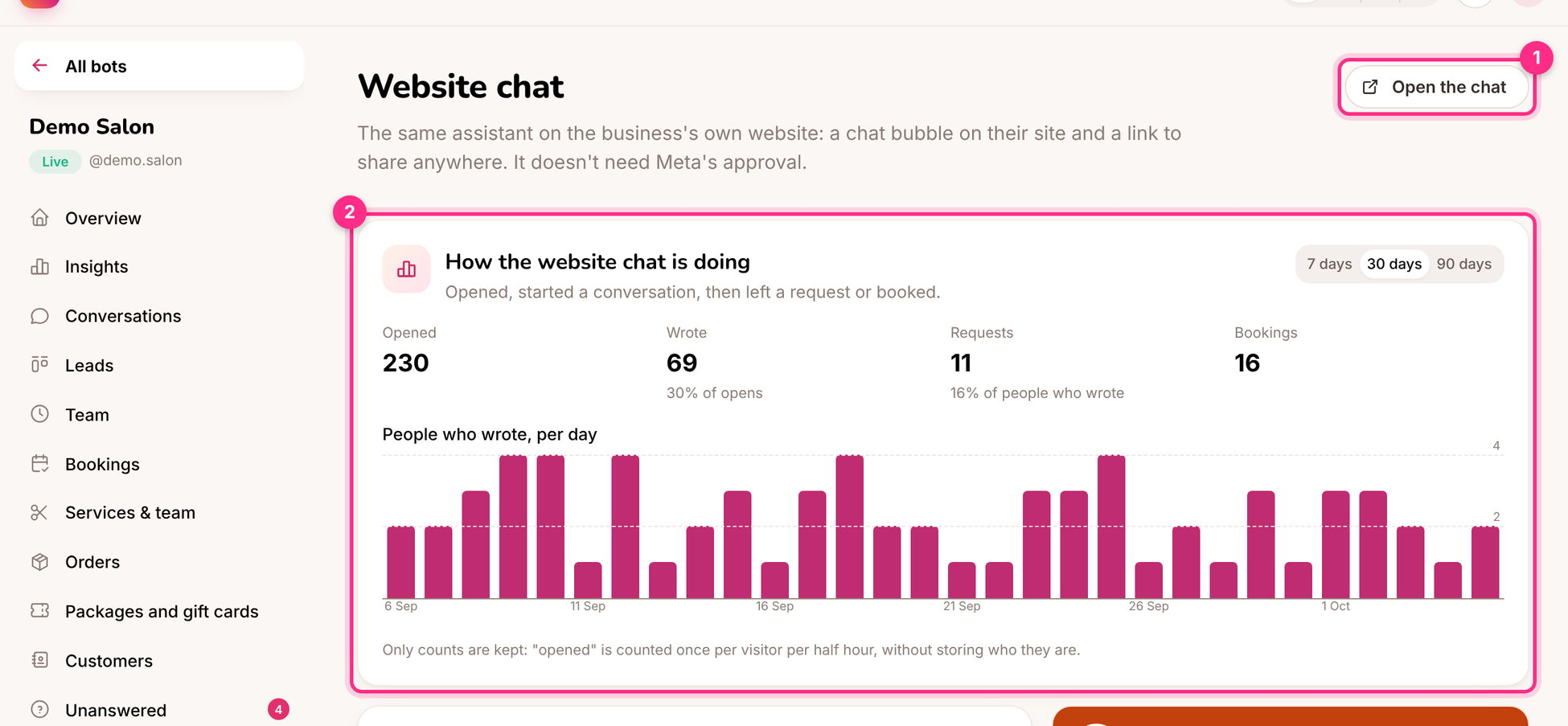
<Frame caption="Website chat: open it (1) and how it's doing (2)">
  <img src="https://mintcdn.com/instaforge/HVDnlmyBMfIyfa_y/images/website-chat.png?fit=max&auto=format&n=HVDnlmyBMfIyfa_y&q=85&s=e6f56ce63bc2a921efb0b1d871126fe7" alt="Website chat: open it (1) and how it's doing (2)" width="1950" height="903" data-path="images/website-chat.png" />
</Frame>

## Set it up

<Steps>
  <Step title="Switch it on and choose the look">
    A colour, a title, a greeting ("Hi! 👋 Ask me about prices, times or booking.") and the side of the screen.
  </Step>

  <Step title="Add it to the website">
    Copy the **Code for the website** and paste it before `</body>` on every page, or in the site builder's "custom code" setting (Wix, Squarespace, WordPress, Tilda, Shopify).
  </Step>

  <Step title="Or share the link">
    Every website chat also has its own page, for example `instaforge.app/c/demo-salon`. Use it in emails, on Google Maps, or as a QR code.
  </Step>
</Steps>

<Columns cols={2}>
  <div>
    <Frame caption="The chat link on a phone">
      <img src="https://mintcdn.com/instaforge/HVDnlmyBMfIyfa_y/images/website-chat-phone.png?fit=max&auto=format&n=HVDnlmyBMfIyfa_y&q=85&s=bd63e35fa7c7d9b7efd7e99cba0d1598" alt="The chat link on a phone" width="1260" height="2532" data-path="images/website-chat-phone.png" />
    </Frame>
  </div>

  <div>
    ### How it works

    * Conversations appear in **Conversations** with a **Website** badge; you can take over and reply there.
    * When the client has several assistants, the one chosen on the client's page answers the chat (the first one until you choose).
    * Visitors are told they're chatting with an automated assistant, and see the privacy policy.
    * No account and no cookies: the browser keeps a private conversation id.
    * The panel (2) shows how many people opened the chat, wrote, left a request and booked.
  </div>
</Columns>

<Tip>
  In the greeting, invite the question people are most likely to have. "Ask me about prices, times or booking" gets far more replies than "How can I help?".
</Tip>


This documentation is built and hosted on [Mintlify](https://mintlify.com), a developer documentation platform.