> ## Documentation Index
> Fetch the complete documentation index at: https://docs.instaforge.app/llms.txt
> Use this file to discover all available pages before exploring further.
# Broadcasts
> One message to a chosen group of customers: free slots this week, a new product, an event.
A broadcast sends one message to a group of customers you choose. Each person gets it on the channel that can reach them now.
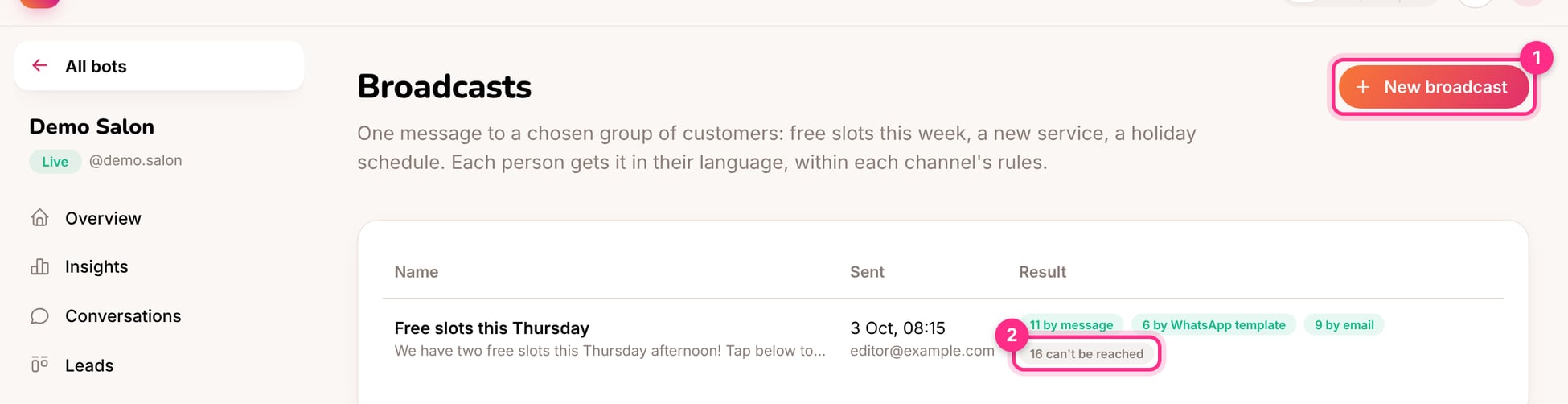 ## Send a broadcast
Give it a name you'll recognise later, such as "Free slots this Thursday".
| Audience | Example |
| - | - |
| People who had an appointment | In the last 90 days |
| People on the waiting list | For a day that just opened up |
| Leads in these stages | New and Contacted |
| People who wrote recently | In the last 7 days |
You can also choose which channels to include: Instagram, Messenger, WhatsApp, the website chat and the booking page. People who said no to messages, or didn't give consent, are always left out.
In each language your customers use. Switch on **Book button** to add a button that starts a booking.
The page shows how many people can get it now, and on which channel.
## How people are reached (2)
Instagram and Messenger only allow messages within 24 hours of the person's last message. So each person gets the broadcast:
1. as a **message**, if their window is open;
2. as a **WhatsApp template**, if they wrote on WhatsApp and a template is set up;
3. by **email**, if they booked on the booking page and left one;
4. otherwise they're **skipped** and counted as "can't be reached".
Broadcasts are for things customers want to hear: a free slot, a new product they asked about, an event. Sending offers too often makes people mute the account.
## Ideas
* "Two slots just opened this Thursday afternoon. Tap below to book."
* "Our autumn menu is here 🍂 Reserve a table for this weekend."
* "The jacket you asked about is back in stock in your size."
This documentation is built and hosted on [Mintlify](https://mintlify.com), a developer documentation platform.
## Send a broadcast
Give it a name you'll recognise later, such as "Free slots this Thursday".
| Audience | Example |
| - | - |
| People who had an appointment | In the last 90 days |
| People on the waiting list | For a day that just opened up |
| Leads in these stages | New and Contacted |
| People who wrote recently | In the last 7 days |
You can also choose which channels to include: Instagram, Messenger, WhatsApp, the website chat and the booking page. People who said no to messages, or didn't give consent, are always left out.
In each language your customers use. Switch on **Book button** to add a button that starts a booking.
The page shows how many people can get it now, and on which channel.
## How people are reached (2)
Instagram and Messenger only allow messages within 24 hours of the person's last message. So each person gets the broadcast:
1. as a **message**, if their window is open;
2. as a **WhatsApp template**, if they wrote on WhatsApp and a template is set up;
3. by **email**, if they booked on the booking page and left one;
4. otherwise they're **skipped** and counted as "can't be reached".
Broadcasts are for things customers want to hear: a free slot, a new product they asked about, an event. Sending offers too often makes people mute the account.
## Ideas
* "Two slots just opened this Thursday afternoon. Tap below to book."
* "Our autumn menu is here 🍂 Reserve a table for this weekend."
* "The jacket you asked about is back in stock in your size."
This documentation is built and hosted on [Mintlify](https://mintlify.com), a developer documentation platform.