> ## Documentation Index
> Fetch the complete documentation index at: https://docs.instaforge.app/llms.txt
> Use this file to discover all available pages before exploring further.
# Your client portal
> What business owners see when they sign in, and what they can do themselves.
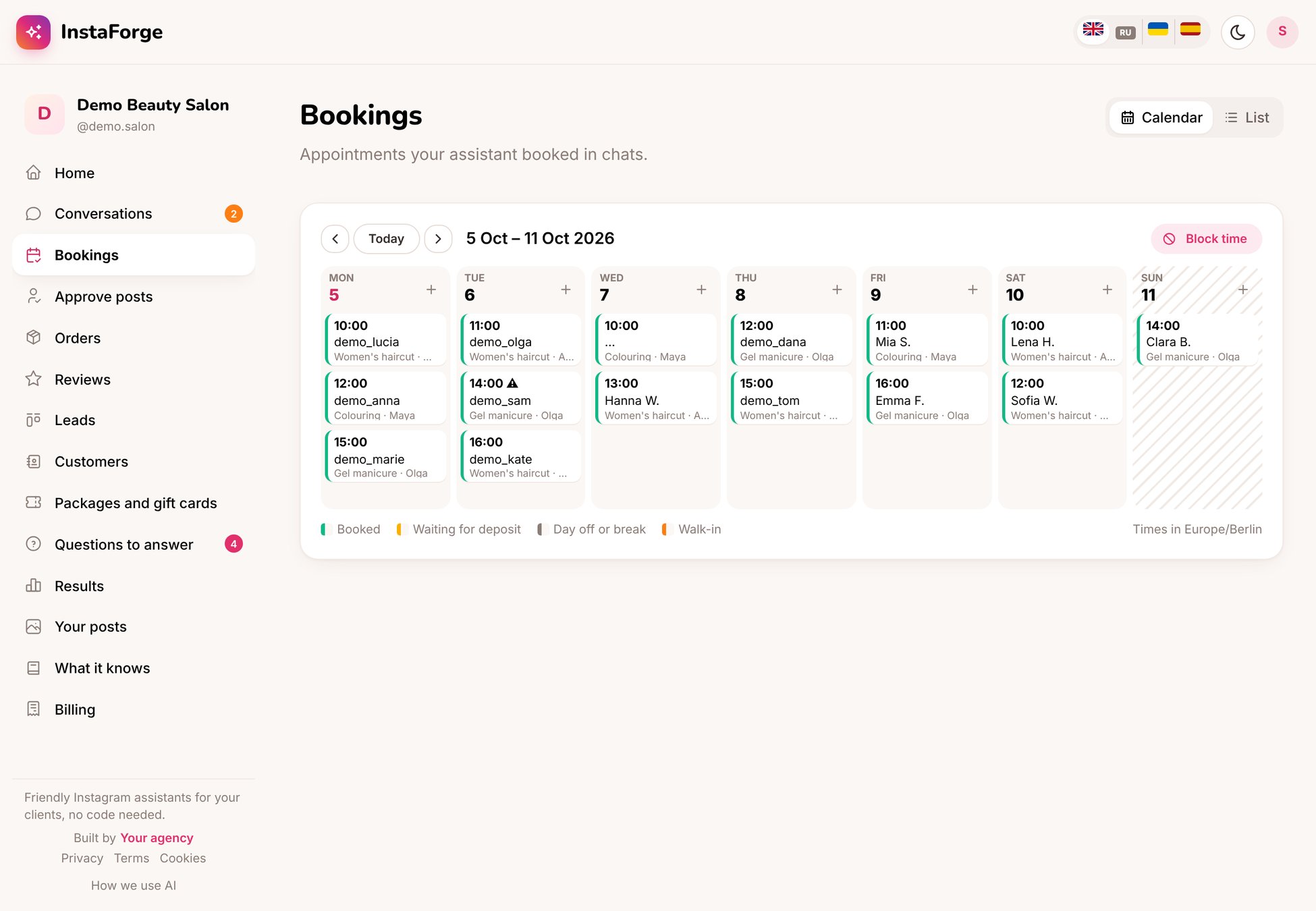
When a business owner signs in, they see a simple portal for their own business: what needs them, their conversations and bookings, and how the assistant is doing. They never see set-up pages or AI costs.
 ## For business owners
People waiting for you, questions to answer, posts to approve, new orders, today's appointments.
Read every chat and reply yourself. Switch on "I'm handling this chat" to pause the assistant.
See and cancel appointments, mark no-shows.
Answer what the assistant didn't know. Your answer teaches it.
Approve scheduled posts or ask for changes.
Numbers and charts: people who wrote, bookings, reviews, sales.
### Something out of date?
Use **Something out of date?** to tell the agency what changed ("From November we're closed on Mondays"). They update the assistant and you're told when it's done.
### Get notifications
Turn on notifications on your phone from the home page, so you know when a customer asks for a person or books.
### Find this guide again
The lifebuoy button at the top of your portal opens this page whenever you need it.
## For business owners
People waiting for you, questions to answer, posts to approve, new orders, today's appointments.
Read every chat and reply yourself. Switch on "I'm handling this chat" to pause the assistant.
See and cancel appointments, mark no-shows.
Answer what the assistant didn't know. Your answer teaches it.
Approve scheduled posts or ask for changes.
Numbers and charts: people who wrote, bookings, reviews, sales.
### Something out of date?
Use **Something out of date?** to tell the agency what changed ("From November we're closed on Mondays"). They update the assistant and you're told when it's done.
### Get notifications
Turn on notifications on your phone from the home page, so you know when a customer asks for a person or books.
### Find this guide again
The lifebuoy button at the top of your portal opens this page whenever you need it.
 ## For the agency: set up the portal
Open the client's **Client portal** page (under **Business** in the client's menu).
## For the agency: set up the portal
Open the client's **Client portal** page (under **Business** in the client's menu).
 Shown at the top of their portal.
Conversations, bookings, customers, questions to answer, what the assistant knows, results, posts, orders and billing. A part you turn off disappears from their menu and can't be opened at all.
A short message at the top of their home page: tips, news, or what you're working on for them.
On the **Domains** page, add an address like portal.their-site.com so the portal, website chat, booking page and shop carry their name. See [Custom domains](/running-the-agency/custom-domains).
In **Users**, add the owner with the **Client** role and only their assistants. Then click **Preview as the client** (1) to see exactly what they see.
A client who answers their own unanswered questions and approves posts in the portal saves you hours a month. Show them these two things in the first call.
This documentation is built and hosted on [Mintlify](https://mintlify.com), a developer documentation platform.
Shown at the top of their portal.
Conversations, bookings, customers, questions to answer, what the assistant knows, results, posts, orders and billing. A part you turn off disappears from their menu and can't be opened at all.
A short message at the top of their home page: tips, news, or what you're working on for them.
On the **Domains** page, add an address like portal.their-site.com so the portal, website chat, booking page and shop carry their name. See [Custom domains](/running-the-agency/custom-domains).
In **Users**, add the owner with the **Client** role and only their assistants. Then click **Preview as the client** (1) to see exactly what they see.
A client who answers their own unanswered questions and approves posts in the portal saves you hours a month. Show them these two things in the first call.
This documentation is built and hosted on [Mintlify](https://mintlify.com), a developer documentation platform.