> ## Documentation Index
> Fetch the complete documentation index at: https://docs.instaforge.app/llms.txt
> Use this file to discover all available pages before exploring further.
# Knowledge base
> Everything the assistant knows about the business, and how to keep it right.
The knowledge base is the assistant's only source of facts about the business. If something isn't here, the assistant says it doesn't know and offers a person, instead of guessing.
 ## Two kinds of entries
| Kind | Use it for | How it's used |
| - | - | - |
| **FAQ** | Prices, policies, anything that must be said exactly | Matched by question and can be sent word for word |
| **Text** | Descriptions, background, longer explanations | Read by the AI and put into its own words |
## Add knowledge
Click **Add information → Paste text**. Headings become sections, and lines written as `Q: … A: …` become FAQ entries:
```
Opening hours
Monday to Friday 10:00 to 19:00, Saturday 10:00 to 16:00.
Q: How much is a women's haircut?
A: 45 EUR, about an hour, including wash and blow-dry.
```
Tick **Also create FAQ entries with AI** to have questions and exact answers written for you from the text.
Upload .txt, .md, .pdf, .docx or .csv files up to 15 MB: a price list, a menu, a policy document.
Paste the client's website. The home page and a few linked pages about prices, services and contact are read.
Check what was found afterwards: websites say things loosely, and the assistant will repeat whatever it learned.
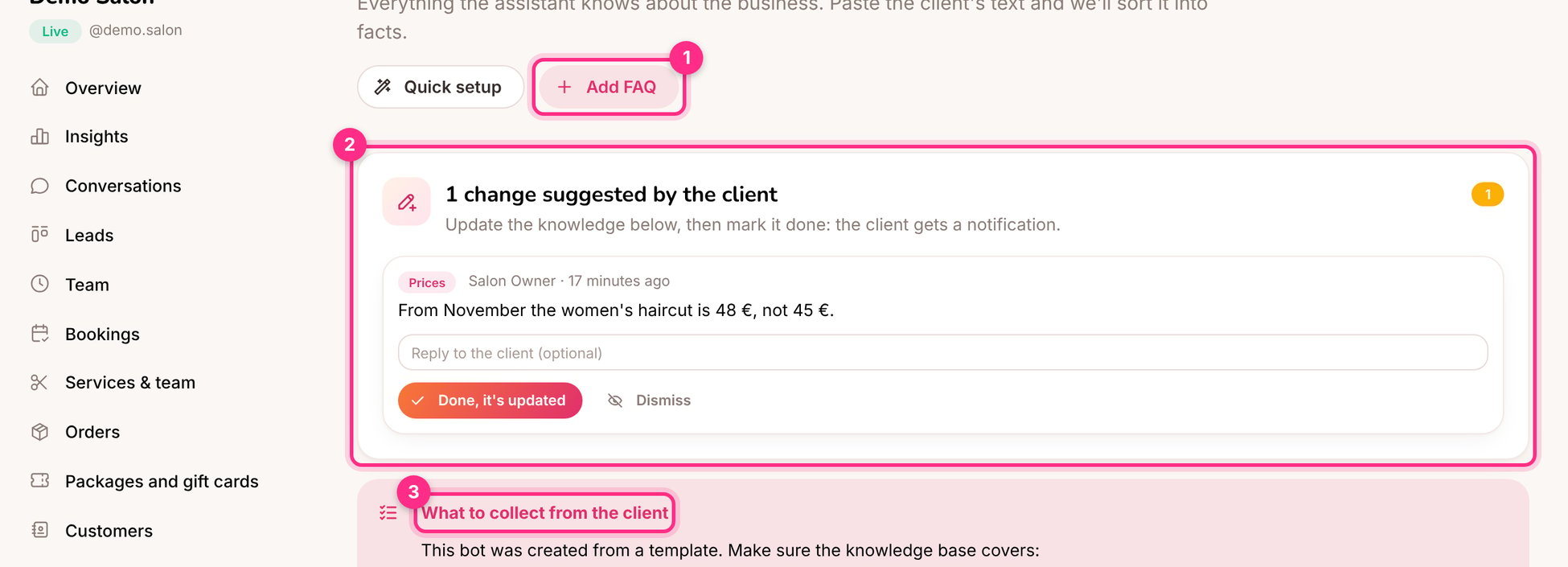
Click **Add FAQ** (1). Write the question the way customers ask it, and the exact answer.
## Check what it would use
Use **Try a question** to see which entries the assistant would use for a question, and whether an FAQ would be sent word for word.
## Changes suggested by the client (2)
Business owners can suggest changes from their portal ("From November the haircut is 48 €"). Update the knowledge, then click **Done, it's updated**: the client is told it's done.
## Tips
* **Say what the business doesn't do.** "We don't do men's haircuts" stops the assistant from offering them.
* **One fact, one place.** If the price is in an FAQ and in a text entry, change both or delete one.
* **Use the checklist (3).** Bots made from a template show what to collect from the client.
* **Answer unanswered questions.** The [Unanswered questions](/build-the-assistant/unanswered-questions) page turns real customer questions into FAQ entries.
This documentation is built and hosted on [Mintlify](https://mintlify.com), a developer documentation platform.
## Two kinds of entries
| Kind | Use it for | How it's used |
| - | - | - |
| **FAQ** | Prices, policies, anything that must be said exactly | Matched by question and can be sent word for word |
| **Text** | Descriptions, background, longer explanations | Read by the AI and put into its own words |
## Add knowledge
Click **Add information → Paste text**. Headings become sections, and lines written as `Q: … A: …` become FAQ entries:
```
Opening hours
Monday to Friday 10:00 to 19:00, Saturday 10:00 to 16:00.
Q: How much is a women's haircut?
A: 45 EUR, about an hour, including wash and blow-dry.
```
Tick **Also create FAQ entries with AI** to have questions and exact answers written for you from the text.
Upload .txt, .md, .pdf, .docx or .csv files up to 15 MB: a price list, a menu, a policy document.
Paste the client's website. The home page and a few linked pages about prices, services and contact are read.
Check what was found afterwards: websites say things loosely, and the assistant will repeat whatever it learned.
Click **Add FAQ** (1). Write the question the way customers ask it, and the exact answer.
## Check what it would use
Use **Try a question** to see which entries the assistant would use for a question, and whether an FAQ would be sent word for word.
## Changes suggested by the client (2)
Business owners can suggest changes from their portal ("From November the haircut is 48 €"). Update the knowledge, then click **Done, it's updated**: the client is told it's done.
## Tips
* **Say what the business doesn't do.** "We don't do men's haircuts" stops the assistant from offering them.
* **One fact, one place.** If the price is in an FAQ and in a text entry, change both or delete one.
* **Use the checklist (3).** Bots made from a template show what to collect from the client.
* **Answer unanswered questions.** The [Unanswered questions](/build-the-assistant/unanswered-questions) page turns real customer questions into FAQ entries.
This documentation is built and hosted on [Mintlify](https://mintlify.com), a developer documentation platform.